
How to Configure a Main Line Phantom
A "Phantom" line is an extension that serves as a "Routing User." Calls are routed to this extension and then forwarded on to be answered. This allows phone calls to be treated by the forwarded user's answering rules and voicemail options.
Example for a Configure Phantom:
- Established Main Telephone Number (ex. 954-607-6031)
- Established Routing User Extension (ex. Main Line Ext 1000)
- Established Front desk/Answering User Extensions (ex. Front Desk Ext 1001 and Executive Assistant Ext 1009)
Example of the Call Flow
Number | Action | Number | Answering Rule | Number | Action |
954-607-6031 | Routes to | "Main Line" 1000 | Simultaneous Ring 1000 and 1009 | 1000 | Ring 1000 |
1009 | Ring 1009 |
Process
1. Click on the Inventory tile.
2. Locate Phone Number (954-697-6031) and click to edit. Note: you can also use the pencil to edit.
3. Assign Treatment as User and assign Ext 1000 (Main Line) to User. Click Save. 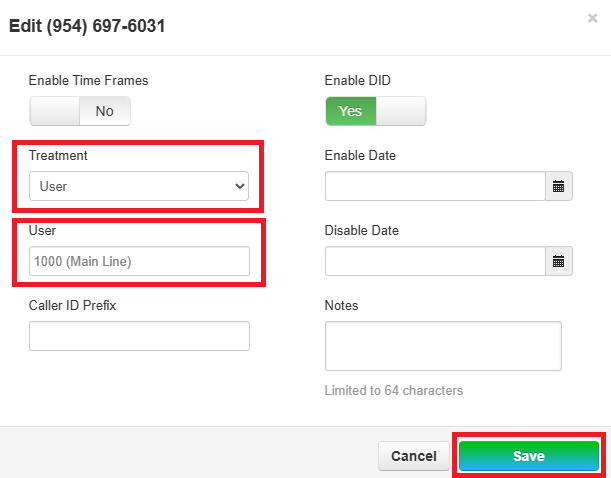
4. Click on the Users tile.. 
5. Locate Routing user (Main Line) Ext 1000 and click to edit. Note: you can also use the pencil to edit.
6. Click the Answering Rule tab and edit the Default Time Frame.
7. Add Rule to the Default Time Frame to Simultaneous Ring extensions 1001 and 1009. Click Save. 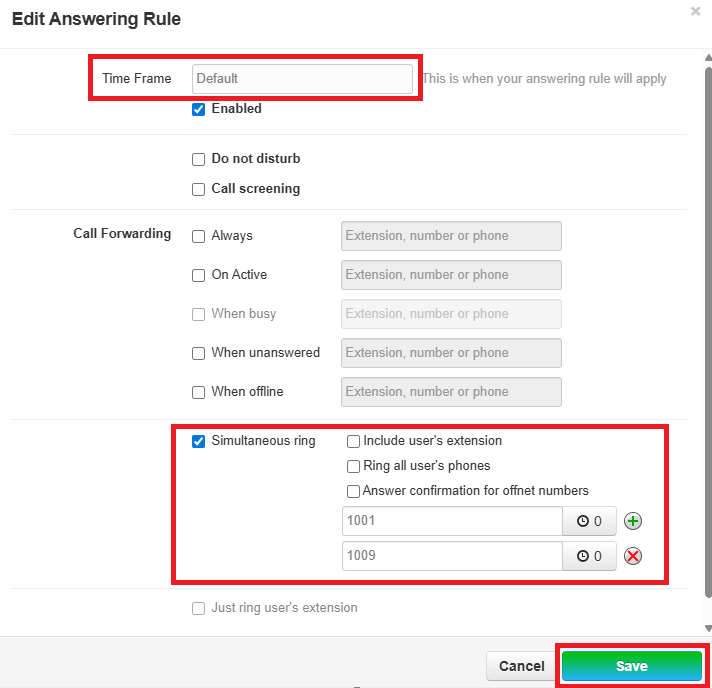
8. You can set "Ring Delays" to prioritize who will answer calls first.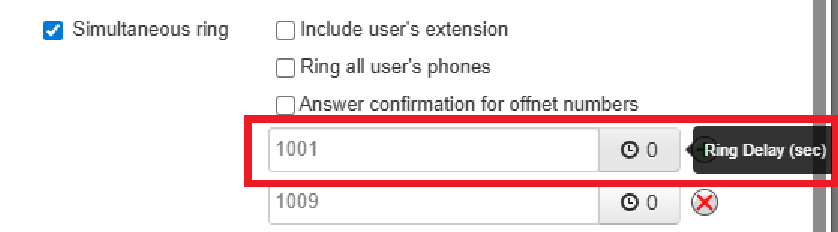
Finished Answering Rules: Call will now be forwarded from Ext 1000 to 1001 and 1009 and ring immediately.
