
Allow and/or Block Certain Numbers Including Suspected SPAM Calls
1. Login to UDT Voice Portal.
2. Navigate to Answering Rules.
3. Click on the Allow / Block Button.

4. Select desire selection from the dropdown and click Done.
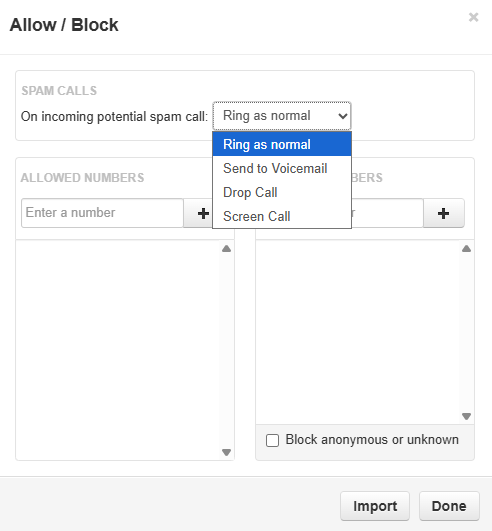
SPAM Calls can be treated as follows:
- Ring as Normal - Calls with SPAM flags will ring as dialed and follow answering rule logic.
- Sent to Voicemail - Calls with SPAM flags will go directly to voice mail, ignoring any answering rule logic.
- Drop Call - Calls with SPAM flags to your extension will immediately be dropped (possibly including legitimate calls flagged as a false positive.
- Screen Call - Calls with SPAM flags to your extension will be screened in the same process as above and follow answering rule logic.
5. Allowed Numbers and Blocked Numbers can be manually entered. Note: use the plus sign to add more numbers.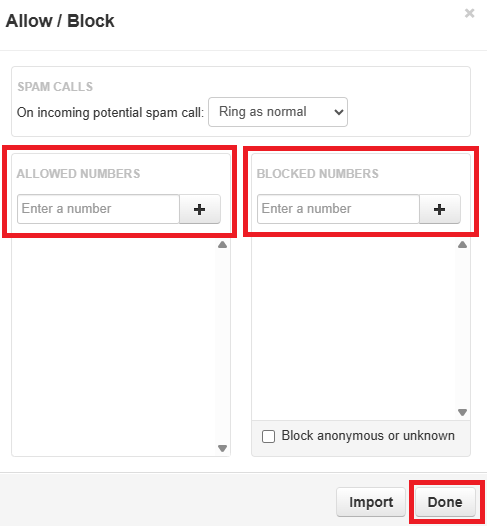
Allowed Numbers:
- Numbers added here can dial through regardless of other treatment options.
Blocked Numbers:
- Numbers added here will be dropped immediately.
- The Block Anonymous or Unknown option will also drop any calls without valid Caller ID or hidden Caller ID.
This section can only be configured with 10 digit numbers and cannot be used to filter internal extensions