
Pre-Queue and In-Queue Options
Pre-Queue Options:
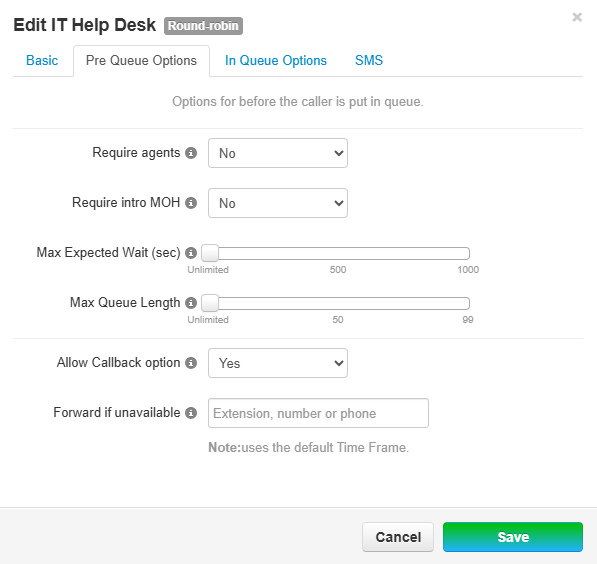
- Require Agents - Agents must be logged in and Available to take calls or otherwise the call queue is set to an unavailable status
- Require Intro MOH (Music-on-Hold) - Requires any defined Messaging to be played in its entirety before entering the queue.
- An example would be playing a message for a link to a help website to entice callers to gain information on what they are calling about without tying up a spot in the queue.
- Max Expected Wait - Allows for setting a maximum wait time in seconds before making the queue unavailable
- Wait Times are an average between time in queue and time for an agent to respond multiplied by how many callers in queue. If time set exceeds this, then the queue will become unavailable until Agents are able to respond to all callers waiting.
- Max Queue Length - Maximum amount of callers before queue goes unavailable
- Allow Callback option - Saves the caller's place in line without having to stay on hook. When an agent picks up the caller, the system will call back the caller in waiting and attempt to connect.
- Forward if Unavailable - If queue is marked unavailable, callers can be forwarded to another number
- By default, if the call queue is unavailable from the options above, the caller is dropped.
In-Queue Options:
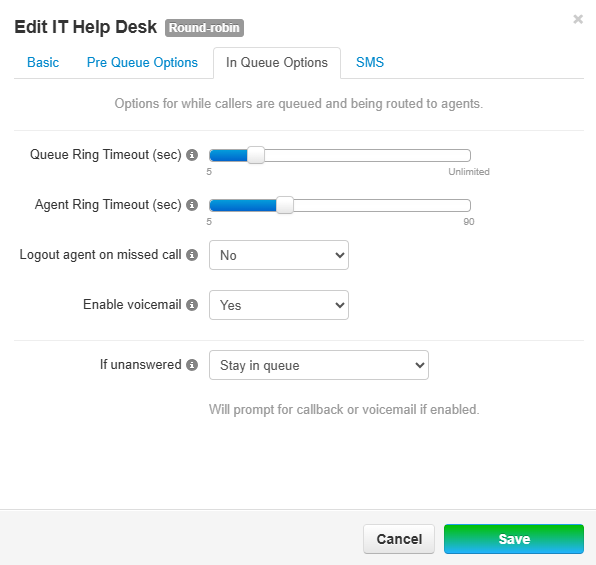
- Queue Ring Timeout - Defines how long for a caller to stay in the queue before being prompted for an exit option
- Agent Ring Timeout - How long to ring an agent before moving onto the next agent
- Logout Agent on Missed Call - If an Agent fails to answer a call, this option can be utilized to log them out and make them unavailable potentially decreasing the time to answer ratio
- Enable Voicemail - Allows callers to leave a voicemail
- If Unanswered - Allows user to either Stay in Queue, be forwarded to another destination, or leave a voicemail
The voicemail box belongs to the Call Queue System User. Agents can check the voicemail box by dialingfollowing 5000these andinstructions inputting the extension of the Call Queue when prompted.here. Voicemail PIN, greeting and voicemail-to-email settings can be configured by contacting the NOC