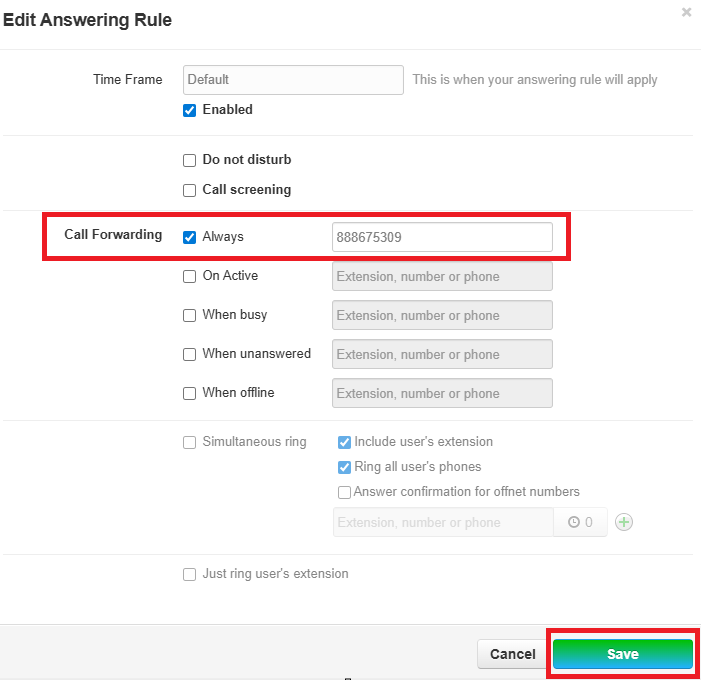
Forward Calls to Another User or Your Cell Phone
Call Forwarding Options
- Always
- Any and all calls will be forwarded to the destination described at all times during the time frame
specifiedspecified.
- Any and all calls will be forwarded to the destination described at all times during the time frame
- On Active
- If you are currently on a call, you can choose to forward your calls to any destination instead of relying on call
waitingwaiting.
- If you are currently on a call, you can choose to forward your calls to any destination instead of relying on call
- When Unanswered
- If a caller does not reach your extension and times out, you can forward that call to another
destinationdestination.- When the new destination times out, caller will be re-routed back to the original dialed voicemail
boxbox.
- When the new destination times out, caller will be re-routed back to the original dialed voicemail
- If a caller does not reach your extension and times out, you can forward that call to another
- When Offline
- If status is set to offline or device is not registered due to loss of connectivity, you can forward your calls to another
destinationdestination.
- If status is set to offline or device is not registered due to loss of connectivity, you can forward your calls to another
Forwarding all calls to another destination:
Utilizing the "Always CallCall" forwarding option:
1. Login to UDT Voice Portal.
2. Navigate to Answering Rule.
3. Click Edit on the specified Time Frame to change (i.e. Default).
4. Click the checkbox for always and specify a destination (either Extension or Telephone NumberNumber) and click Save.