
Basic Function Descriptions of CP925/CP935W/CP965
CP925/CP935W
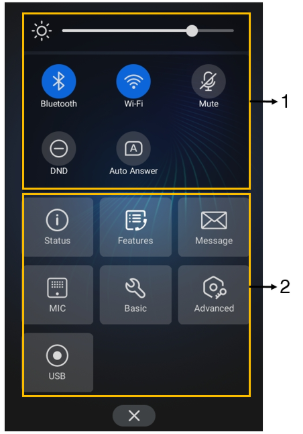
No. | Item | Description |
|---|---|---|
1 | Backlight Slider | Drag the slider to adjust the screen brightness quickly. |
1 | Bluetooth | • Tap to turn Bluetooth on or off quickly. • Long tap to enter the Bluetooth setting screen. |
1 | Wi-Fi | • Tap to turn Wi-Fi on or off quickly. • Long tap to enter Wi-Fi setting screen. |
1 | Mute | Tap to turn mute on or off quickly. |
1 | DND | Tap to turn DND on or off quickly. |
1 | Auto Answer | Tap to turn auto answer on or off quickly. |
2 | Status | Tap to enter the Status menu. |
2 | Features | Tap to enter the Features setting menu. |
2 | Message | Tap to enter the Message setting menu. |
2 | MIC (coming soon) | Tap to enter the MIC setting menu. |
2 | Basic | Tap to enter the Basic setting menu. |
2 | Advanced | Tap to enter the Advanced setting menu. |
2 | USB | Tap to view the recorded audio and the available recording time. |
CP965
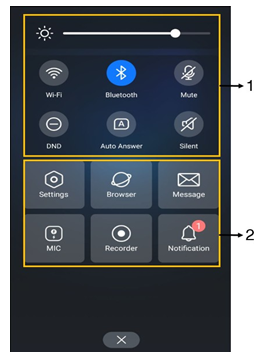
No. | Item | Description |
|---|---|---|
1 | Backlight Slider | Drag the slider to adjust the screen brightness quickly. |
1 | Bluetooth | • Tap to turn Bluetooth on or off quickly. • Long tap to enter the Bluetooth setting screen. |
1 | Wi-Fi | • Tap to turn Wi-Fi on or off quickly. • Long tap to enter Wi-Fi setting screen. |
1 | Mute | Tap to turn mute on or off quickly. |
1 | DND | Tap to turn DND on or off quickly. |
1 | Auto Answer | Tap to turn auto answer on or off quickly. |
1 | Silent | Tap to turn silent mode on or off quickly. |
2 | Settings | Tap to enter the Settings menu. |
2 | Browser | Tap to browse web pages. |
2 | Message | Tap to enter the Message setting menu. |
2 | MIC | Tap to enter the MIC setting menu. |
2 | Recorder | Tap to use the Recorder to record audio and manage the recording. |
2 | Notification | Tap to view the desired notification message. |
To access these options: Swipe down from the top of the screen or tap More on the idle screen. Swipe up from the bottom of the screen or tap the Home Touch key to exit this screen.