
Basic Function Descriptions of CP925/CP935W/CP965
CP925/CP935W
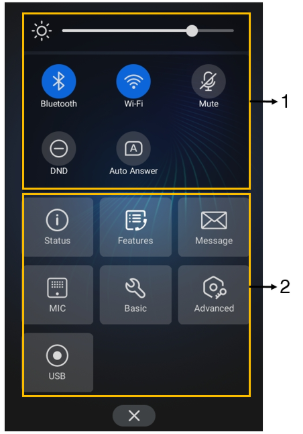
No. | Item | Description |
|---|---|---|
1 | Backlight Slider | Drag the slider to adjust the screen brightness quickly. |
1 | Bluetooth | • Tap to turn Bluetooth on or off quickly. • Long tap to enter the Bluetooth setting screen. |
1 | Wi-Fi | • Tap to turn Wi-Fi on or off quickly. • Long tap to enter Wi-Fi setting screen. |
1 | Mute | Tap to turn mute on or off quickly. |
1 | DND | Tap to turn DND on or off quickly. |
1 | Auto Answer | Tap to turn auto answer on or off quickly. |
2 | Status | Tap to enter the Status menu. |
2 | Features | Tap to enter the Features setting menu. |
2 | Message | Tap to enter the Message setting menu. |
2 | MIC (coming soon) | Tap to enter the MIC setting menu. |
2 | Basic | Tap to enter the Basic setting menu. |
2 | Advanced | Tap to enter the Advanced setting menu. |
2 | USB | Tap to view the recorded audio and the available recording time. |
CP965
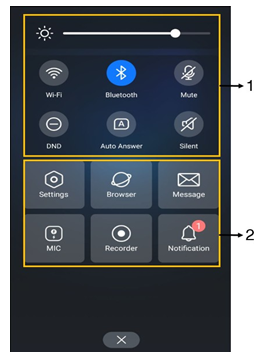
No. | Item | Description |
|---|---|---|
1 | Backlight Slider | Drag the slider to adjust the screen brightness quickly. |
1 | Bluetooth | • Tap to turn Bluetooth on or off quickly. • Long tap to enter the Bluetooth setting screen. |
1 | Wi-Fi | • Tap to turn Wi-Fi on or off quickly. • Long tap to enter Wi-Fi setting screen. |
1 | Mute | Tap to turn mute on or off quickly. |
1 | DND | Tap to turn DND on or off quickly. |
1 | Auto Answer | Tap to turn auto answer on or off quickly. |
1 | Silent | Tap to turn silent mode on or off quickly. |
2 | Settings | Tap to enter the Settings menu. |
2 | Browser | Tap to browse web pages. |
2 | Message | Tap to enter the Message setting menu. |
2 | MIC | Tap to enter the MIC setting menu. |
2 | Recorder | Tap to use the Recorder to record audio and manage the recording. |
2 | Notification | Tap to view the desired notification message. |